
All Your PuTTY Sessions in One Tabbed Window
getPutty wraps PuTTY (or KiTTY) windows into tabs and tiles, keeps your servers in a tree, logs you in and runs scripts on one or every session at once. A drop-in replacement for MTPuTTY that is 57 times smaller and needs no runtime.
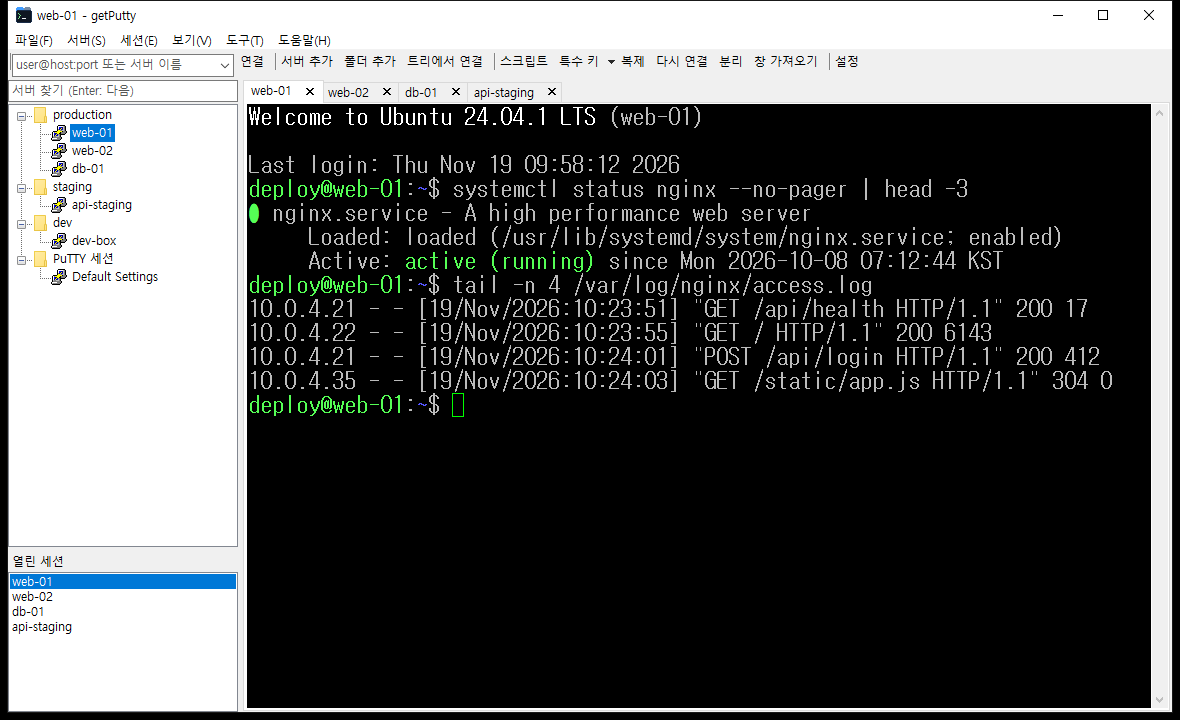
- Server Tree & Folders
- Tabs, Side by Side, Grid
- Login Scripts
- Send to All Sessions
- Auto-Reconnect
- Detach / Attach
- Remappable Hotkeys
- MTPuTTY Import
- DPAPI-Encrypted Passwords
- No C Runtime, No Installer
Every MTPuTTY Feature, None of the Weight
getPutty manages the real PuTTY you already trust. It never touches the SSH connection itself — it organizes the windows around it.
Switch from MTPuTTY in a Minute
One menu command reads mtputty.xml and rebuilds your folders, servers, command lines, options and hotkeys.
Session scripts, the sessions box, tiling and detach/attach all work the way you are used to.
94 KB, Zero Dependencies
Plain C against the Win32 API with no C runtime, no .NET and no installer. Copy the single executable anywhere — even a USB stick — and it keeps its settings right next to it.
Windows XP to Windows 11
The current PuTTY still runs on Windows XP, so getPutty does too. It is compiled so that any API newer than XP is a build error, and every build checks its import table.
From Download to Logged In
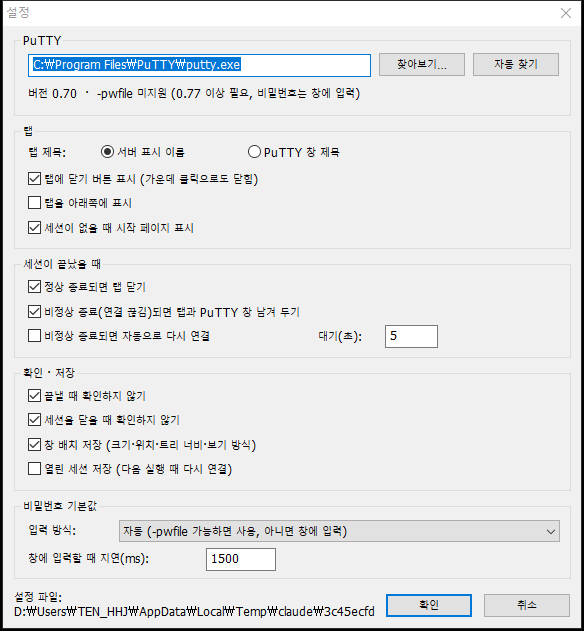
getPutty finds putty.exe by itself and shows your saved PuTTY sessions right away.
Download & run
Save getPutty.exe anywhere and double-click it. If MTPuTTY is installed, getPutty offers to import its server tree on first start.
Add your servers
Create folders and servers with host, port, user, password and an optional login script — or simply use the PuTTY sessions folder.
Double-click to connect
Each connection opens as a tab with PuTTY inside. Type user@host:port in the toolbar box for one-off connections.
Built for People Who Live in a Terminal
Everything below is in the 94 KB executable. The interface is in Korean; this page translates the labels.
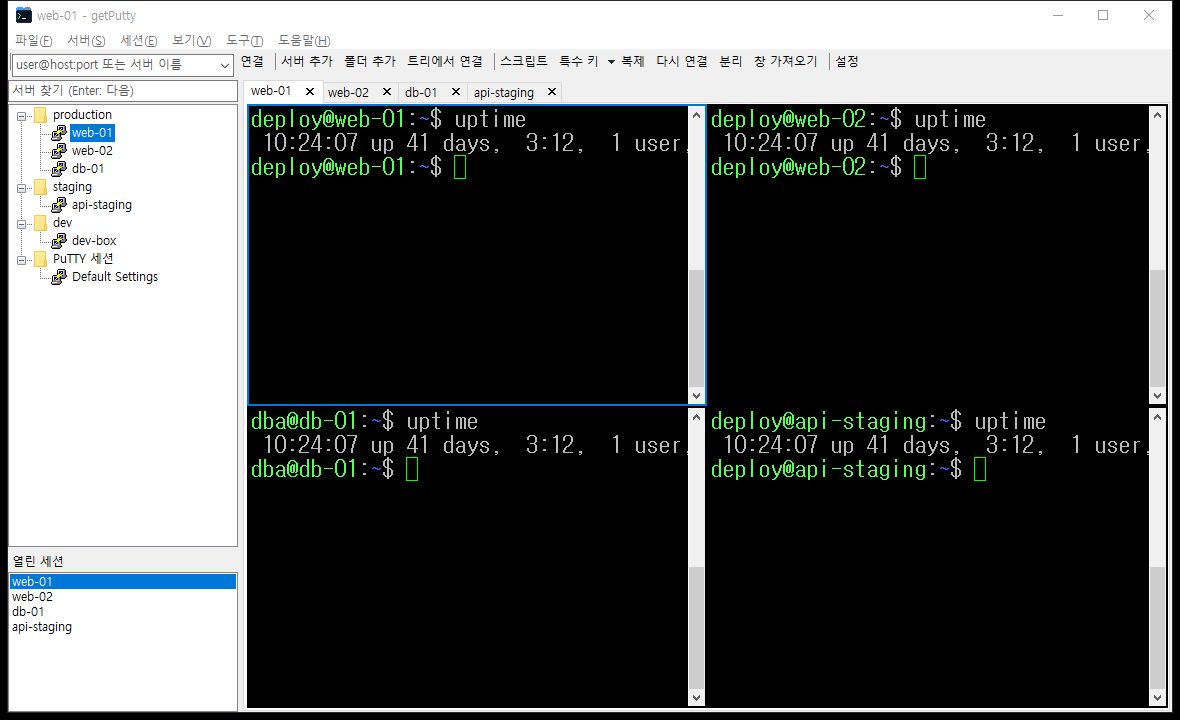
Watch Many Servers at Once
Keep one session per tab, or tile every open session side by side, stacked or as a grid. The active one gets a highlighted border.
- Real PuTTY inside: your PuTTY settings, colors and key bindings all still apply.
- Tab handling: close buttons, middle-click to close, drag to reorder, rename, duplicate, reconnect.
- Detach / attach: pop a session out to its own window, or pull any open PuTTY window into a tab.
- PuTTY menu on the tab: right-click a tab for PuTTY’s own system menu (settings, event log, clear scrollback).
Type Once, Run Everywhere
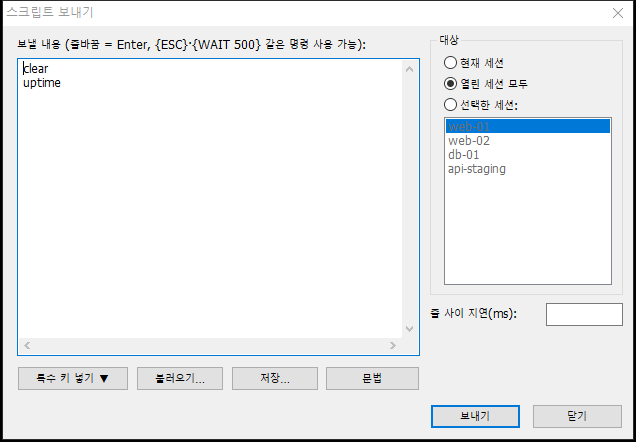
Send a script to the current session, to every open session, or to the ones you pick. The dialog remembers its text and targets.
- Special keys:
{ESC},{UP},{F5},{CTRL+C},{ALT+x}and more — also from a menu without opening the dialog. - Timing:
{WAIT 500}pauses, plus an optional delay between lines. - Login scripts: each server can run its own script after login, with
{USER},{PASSWORD},{HOST}. - Strict about Enter: a line without a trailing newline is typed but not submitted, exactly like MTPuTTY.
Every Server Where You Expect It
Folders, drag-and-drop, copy and paste, sorting and instant search. Your saved PuTTY sessions appear in their own folder automatically.
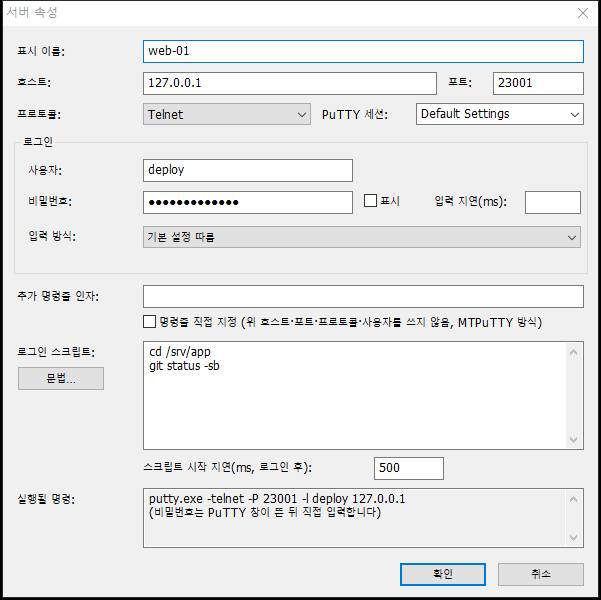
- Command preview: the server dialog shows the exact PuTTY command line before you connect.
- PuTTY sessions get logins too: attach a user, password and script to any saved session.
- Mass password update: change the password of every server for one user in one step.
- Import / export: move the whole tree as XML, with or without passwords.
Passwords Stay Off the Command Line
Any program on a PC can read another program’s command line. getPutty stores passwords encrypted with Windows DPAPI and hands them to PuTTY without putting them there.
- PuTTY 0.77+: a temporary
-pwfilethat is deleted seconds later. - Older PuTTY: typed into the PuTTY window after a delay you can set per server.
- MTPuTTY import: plain
-pwvalues found in command lines are moved into encrypted storage.
| Mode | How | On command line? |
|---|---|---|
| Automatic | -pwfile if PuTTY ≥ 0.77, else typed | No |
| -pwfile | temporary file, deleted after start | No |
| Type into window | after the per-server delay | No |
| -pw | command-line argument | Yes (not recommended) |
Designed Never to Freeze
Once a session is running, every call into its PuTTY window is posted or asynchronous, so one hung PuTTY cannot lock getPutty. Confirmation boxes are always owned by, and shown over, the main window.
- Session ends cleanly: close the tab automatically, or keep it.
- Connection drops: keep the window, close it, or reconnect automatically after N seconds.
- Comes back as you left it: window layout and open sessions are restored on the next start.
getPutty and MTPuTTY Side by Side
getPutty values are measured on the current build; MTPuTTY values on version 1.8 as installed on the test PC.
94 KB
Single portable .exe
0
Runtime dependencies
10
System DLLs imported
XP–11
Windows versions supported
| Item | getPutty | MTPuTTY 1.8 |
|---|---|---|
| Executable size | 95,744 bytes | 5,481,840 bytes |
| Installation | None — portable | Installer (portable mode available) |
| Password storage | Windows DPAPI | Own encryption |
| Password to PuTTY | -pwfile or typed | Typed, or -pw on the command line |
| Tiling | Side by side, stacked, grid | Drag tabs to dock anywhere |
| Import from the other | Reads mtputty.xml | — |
| Visual themes | Windows default only | Theme setting |
| Interface language | Korean | English |
| Oldest Windows | Windows XP | — |
Get getPutty
One portable executable. No installer, no telemetry, no network access of its own.
getPutty.exe
Self-contained 32-bit executable. Put a getputty.xml next to it to keep settings on a USB drive.
Before you start
- getPutty runs PuTTY; it does not include it. Install PuTTY (0.77 or newer recommended) or KiTTY.
- Passwords are encrypted for your Windows account and cannot be read on another PC. Use Export tree to move them.
- MTPuTTY passwords cannot be imported; re-enter them once with Mass password update.
SHA-256 Integrity Verification
84a47339b3d519442ffaeb4d42727dc5a3f599ac723f4beeb76fe2830897bfd8 getPutty.exe
Frequently Asked Questions
Do I still need PuTTY?
Yes. getPutty starts putty.exe (or kitty.exe) and places its window inside a tab. It finds PuTTY next to itself, in Program Files or on the PATH; you can also pick the file under Tools → PuTTY location. All of your PuTTY settings and saved sessions keep working.
Can I bring my MTPuTTY servers over?
Yes. File → Import MTPuTTY settings reads %APPDATA%\TTYPlus\mtputty.xml and rebuilds the folders, servers and command lines, and optionally the PuTTY path, options and hotkeys. Passwords are the exception: MTPuTTY stores them with its own undocumented encryption and writes only -pw ***** into command lines. getPutty removes that mask and tells you how many servers need a password, then opens Mass password update.
Where are my passwords stored?
In getputty.xml, encrypted with Windows DPAPI for your Windows account. Only that account on that PC can decrypt them. When you export the tree you choose whether to include passwords in plain text or leave them out.
Does it really run on Windows XP?
The executable has no C runtime, declares OS version 5.1 and is compiled with _WIN32_WINNT=0x0501, so using any Windows API newer than XP fails the build. A script checks the import table on every build. getPutty needs nothing else; whether PuTTY itself runs depends on the PuTTY version you use.
Why do I get “Access denied” on login?
With PuTTY older than 0.77 the password is typed into the window after a delay (1.5 s by default). If the server takes longer to show its password prompt, increase the delay in the server’s properties or in Settings. Upgrading PuTTY to 0.77 or newer switches to -pwfile, which avoids the timing entirely.
Do the hotkeys interfere with my shell?
Default hotkeys use Ctrl+Shift combinations (plus Ctrl+Tab and Ctrl+`) so shell shortcuts such as Ctrl+B, Ctrl+K and Ctrl+T reach the server. They are active only while getPutty is the foreground window and can all be changed under Tools → Hotkeys.
Is there an English interface?
Not yet — menus and dialogs are in Korean. The user manual lists every menu item and message with an English translation.
One Window for Every Server You Manage
94 KB, no install, your existing PuTTY. Import MTPuTTY and keep working.